MacBook Neo vs MacBook Air M5 – here are the differences
Daniel Haaf
Editor
Updated: 9 March 2026
Choosing between the cheaper MacBook Neo and the more expensive but more capable MacBook Air M5? Here is a simple overview of all the differences you need to know.
TLDR
MacBook Neo costs almost half as much as the MacBook Air M5.
MacBook Neo is perfectly adequate for studies and everyday tasks.
MacBook Neo has fewer speakers, a simpler trackpad and a worse selfie camera.
MacBook Air M5 has significantly stronger performance.
MacBook Air M5 has a better screen with more vivid colours.
MacBook Air M5 is better suited for demanding work and multitasking.
Design
Both MacBook Neo and MacBook Air are made of aluminium. The dimensions differ depending on which model and configuration you choose. Here are the official dimensions to keep in mind:
MacBook Neo:
127 x 297.5 x 206.4 mm
1.23 kg
MacBook Air 13 inch:
113 x 304.1 x 215 mm
1.23 kg
MacBook Air 15 inch:
115 x 340.4 x 237.6 mm
1.51 kg
MacBook Neo is thicker than both variants of the MacBook Air, but slightly smaller in width and depth. It is a marginal difference that will hardly be noticeable, especially as the weight of the Neo and the 13‑inch Air model is identical.
The reason why the Neo can be smaller in width and depth has to do with the screen. MacBook Neo has a 13‑inch screen while MacBook Air has a 13.6‑inch screen.
The screen
The difference between the screens is large. Where MacBook Neo has a smaller screen with lower resolution, limited colour gamut to sRGB and lacks True Tone, MacBook Air has a larger screen with higher resolution, support for Display P3 and True Tone.
MacBook Air:
Resolution: 2,560 x 1,664 (13 inch) or 2,880 x 1,864 (15 inch)
Support for Display P3
True Tone, which adjusts colour tone to surrounding light
MacBook Neo (13 inch):
Resolution: 2,408 x 1,506
Support for sRGB
Lacks True Tone
The difference in sharpness is small in practice. The colour gamut is a much bigger difference where the Display P3 screen in the MacBook Air can show up to 25% more colours than the sRGB screen in the MacBook Neo. It is most noticeable in red and green tones.
True Tone is a technology that adjusts the screen’s colour tone to the surrounding light. By measuring the colour and intensity of the ambient light, the screen can adjust the white point to make it more comfortable to look at. The technology is convenient, but you can do exactly the same thing manually in the settings if you want.
If you are planning to connect an external screen it is important to know the limitations of the MacBook Neo. You can only use one of the USB‑C ports and it is limited to a maximum of 4K at 60 Hz. There is no 120 Hz support here.
MacBook Air is more powerful with a faster M5 chip and more memory.
Image: Apple
Processor and memory
MacBook Neo:
A18 Pro chip (the same as in iPhone 16 Pro / Pro Max)
6‑core CPU and 5‑core GPU
8 GB RAM
256 GB or 512 GB storage
MacBook Air:
Apple M5 chip
10‑core CPU and 8‑core GPU
16, 24 or 32 GB RAM
512 GB or 1, 2 or 4 TB storage
MacBook Air is significantly faster, especially for multitasking, heavier applications and AI features. It is better suited for, for example, lighter video editing, photo editing and more demanding work.
MacBook Neo handles email, web browsing, video meetings, documents and simpler photo editing without problems. It can also manage lighter games. For everyday use it goes a long way, but it is not built for heavy workloads.
An important difference is the memory. 8 GB RAM in the Neo can feel limiting, especially if you want to do more than light office work. It is not possible to upgrade the Neo to more RAM, whereas the Air models can be configured with 16, 24 or 32 GB.
Battery life and charging
MacBook Neo gives:
Up to 16 hours of video streaming
Up to 11 hours of web browsing
Battery capacity of 36.5 Wh
MacBook Air gives:
Up to 18 hours of video streaming
Up to 15 hours of web browsing
Battery capacity of 53.8 Wh (13 inch) or 66.5 Wh (15 inch)
The difference is not dramatic. Both last a full working day.
MacBook Air has MagSafe charging and supports fast charging with power adapters of 70 watts or more. MacBook Neo charges via USB‑C and can be charged with any compatible 20‑watt mobile charger or faster.
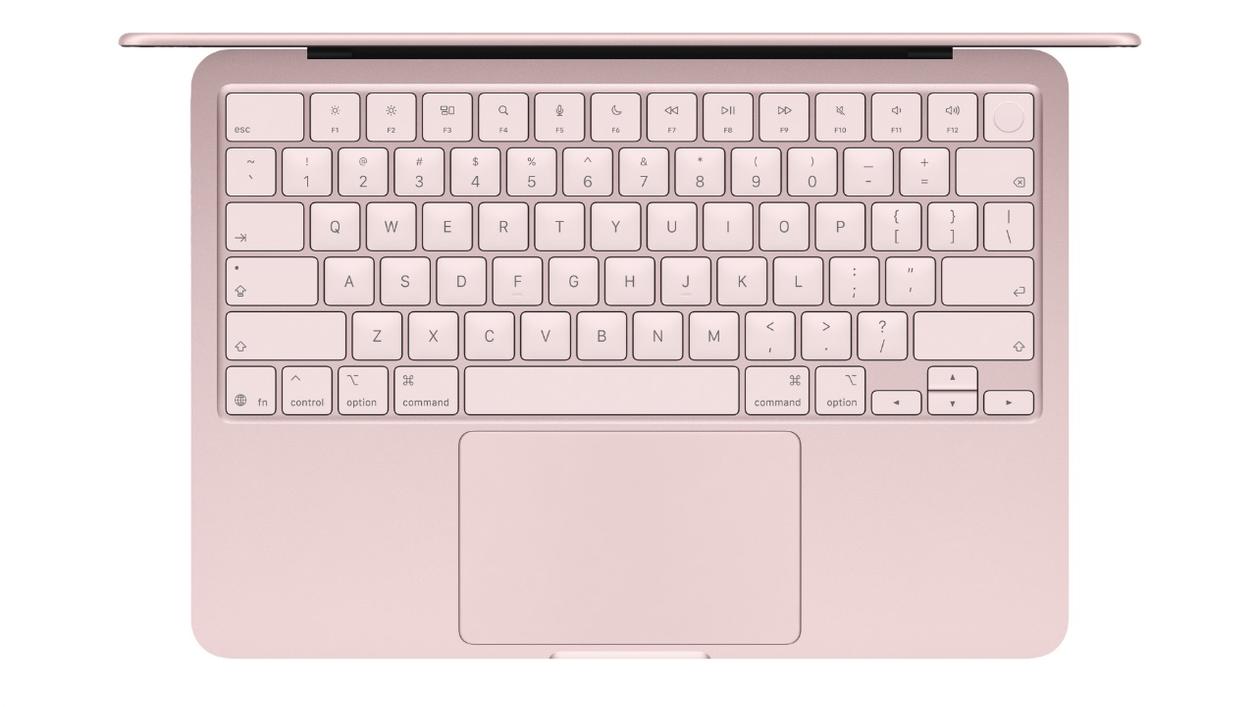
MacBook Neo lacks a backlit keyboard.
Image: Apple
Connections
There are some differences in the connections that MacBook Neo and MacBook Air offer users.
MacBook Neo:
Wi‑Fi 6E
Bluetooth 6
Two USB‑C ports (1 x USB 2, 1 x USB 3)
MacBook Air:
Wi‑Fi 7
Bluetooth 6
Two Thunderbolt 4 ports (USB‑C)
In practice there is not much difference between Wi‑Fi 6E and Wi‑Fi 7 in everyday use. Even if the difference in theoretical maximum speed and channel bandwidth is large, it will not be noticeable in practice for the vast majority.
What may be worth keeping an eye on, however, are the differences in the ports. Where the MacBook Neo has to make do with one port essentially only for accessories and charging, and one faster one for data transfer and an external screen, the MacBook Air can offer dual Thunderbolt 4 ports which are significantly faster.
Other
MacBook Neo:
Two speakers
Simpler Multi‑Touch trackpad
Keyboard without backlighting
Touch ID (512 GB only)
Simpler 12‑megapixel selfie camera (1080p)
MacBook Air:
Four (13 inch) or six (15 inch) speakers
More advanced Force Touch trackpad
Light sensor for the True Tone screen
Backlit keyboard
Touch ID
Newer 12‑megapixel Centre Stage selfie camera (1080p)
Looking more closely at the details, there are clear differences between the Neo and the Air.
Where the Neo has to make do with two speakers, the older type of trackpad and a keyboard without backlighting, both Air models can offer four or six speakers, a Force Touch trackpad and a backlit keyboard.
In addition, both Air models support Touch ID and have the newer Centre Stage selfie camera, something the Neo lacks in its basic version. If you want Touch ID in your laptop, you have to go for the 512 GB model of the Neo. There is no Centre Stage camera, but instead the simpler, older style selfie camera.
Which should you choose?
Choose MacBook Neo if:
You want the cheapest possible MacBook
You are studying or working with simple tasks
You prioritise price over maximum performance
With a student discount, the price drops even further. For many, the Neo works as a stable everyday computer, roughly like Apple’s equivalent of a Chromebook – but with macOS.
Choose MacBook Air if:
You work with demanding applications
You want a better screen and more storage
You want a computer that will last a long time without feeling slow
The higher price tag gives clearly better performance and more room to work. MacBook Air is a model that makes it easier to grow with the computer, but at a slightly higher price.