Best USB Hubs October 2026
Compare top-rated USB hubs to expand your computer ports for everyday peripherals and accessories. This independent guide highlights the key features, advantages, and trade-offs of each model to help you pick the right match for your setup.
Last updated: 6 October 2026

USB Hubs: Top 5
1
Lenovo USB-C to 4 Port USB-A Hub
from £13.917 stores
from £13.91
7 stores
2
Belkin 4-Port USB 2.0 Hub F4U042
from £9.993 stores
from £9.99
3 stores
3
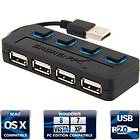
Sabrent HB-UMLS
from £5.694 stores
from £5.69
4 stores
4
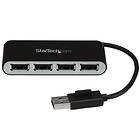
StarTech ST4200MINI2
from £8.992 stores
from £8.99
2 stores
5
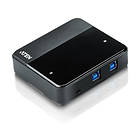
Aten US234
from £58.992 stores
from £58.99
2 stores
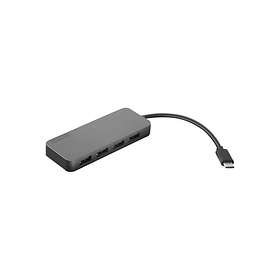
The Lenovo USB-C to 4 Port USB-A Hub connects through modern USB-C ports to provide four standard Type-A connections. It supports USB 3.1 Gen 1 speeds up to 5 Gbps for fast file transfers. Weighing just 42 g, it is an easy accessory to carry along with a laptop.



Pros
Four USB 3.1 Gen 1 ports
Fast 5 Gbps transfer speeds
Lightweight design at 42 g
Modern USB-C host connection
Cons
Wired USB-C host only
No dedicated power adapter
The Belkin F4U042 is a wired 4-port USB 2.0 hub designed for connecting standard peripherals like keyboards and mice. It draws power directly from your computer via USB without needing an external wall plug. It also includes support for legacy FireWire 400 connections.
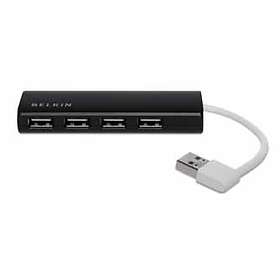


Pros
Four USB Type-A ports
Bus-powered operation
Includes FireWire 400 connectivity
Cons
Limited to USB 2.0 speeds
No USB-C connectivity
The Sabrent HB-UMLS expands a single port into four USB 2.0 Type-A connections for everyday desktop accessories. Its bus-powered design keeps your desk tidy without requiring a separate power brick. It provides a simple solution for standard peripherals.
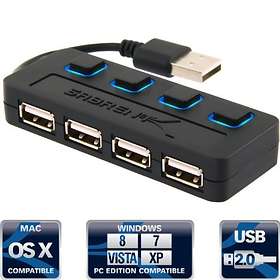

Pros
Four USB Type-A ports
Bus-powered setup
Simple wired connection
Cons
Limited to USB 2.0 speeds
No USB 3.0 or USB-C ports
The StarTech ST4200MINI2 is a compact, bus-powered hub built for tight workspaces and mobile use. At only 33 g, it provides four standard USB 2.0 ports alongside FireWire 400 support. Its small dimensions make it convenient to slip into any bag.
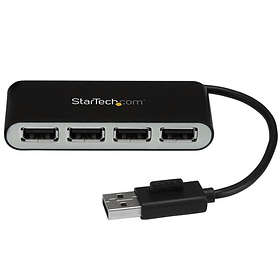
Pros
Ultra-lightweight at 33 g
Compact footprint
Four USB Type-A ports
FireWire 400 compatibility
Cons
Limited to USB 2.0 speeds
Lacks modern USB-C ports
The Aten US234 features USB 3.1 Gen 1 technology, delivering transfer speeds up to 5 Gbps across its ports. It includes Micro-USB and USB Type-A connectivity in a sturdy desktop housing. It is designed for setups where high-speed throughput is prioritized over high port count.



Pros
USB 3.1 Gen 1 speeds up to 5 Gbps
Micro-USB and USB-A connections
Bus-powered design
Cons
Only 2 USB ports
Heaviest in the group at 120 g
Compare specifications
| USB (total) | 4 pc. | 4 pc. | 4 pc. | 4 pc. | 2 pc. |
|---|---|---|---|---|---|
| Connection | Wired | Wired | Wired | Wired | Wired |
| USB 3.1 Gen 1 (5 Gbps) | 4 pc. | 0 pc. | 0 pc. | — | 2 pc. |
| USB 2.0 | — | 4 st | 4 st | 4 st | 0 st |
| Color | Black, White, Silver, Grey | Black | Black | Black, Silver, Grey | Black, Grey |
How we create the list
The ranking is updated monthly and is based on data we collect from our own platform. Products that rank highly are popular among our users while also maintaining high quality according to editorial expert assessments. Specifically, we weigh how many users follow the product via price alerts or lists, how it is rated by experts and users, as well as how much traffic it generates to stores and how well it is represented in retail. The texts on this page are AI-generated and created to give you a quick and clear overview. No products are paid placements – the ranking is driven solely by data.